Tank Controls
PC:
- WASD / Arrow Keys: Move.
- Mouse: Aim.
- Left Click / Space: Shoot.
- E: Toggle Auto Fire.
- C: Toggle Auto Spin.
- T: View the tank upgrade tree.
Mobile:
- Left Joystick: Move your tank.
- Right Joystick: Aim and shoot.
- On-screen Upgrade Buttons: Upgrade tank stats and select new tank classes.
- On-screen Controls: Access additional combat functions when available.


















Arras.io
Rule the Arena with Arras.io Game
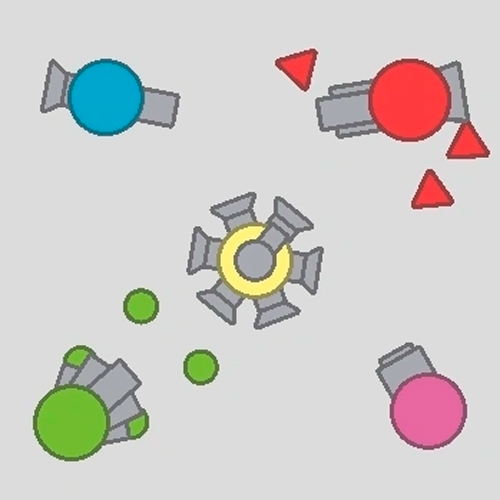
Arras.io is a 2D multiplayer tank shooting game, where players compete in real-time PvP battles across a top-down arena. In this action-packed .io game, you start with a basic tank, destroy geometric shapes to earn experience, level up, and unlock more powerful tank classes.
As your tank grows stronger, you can hunt rival players, survive intense firefights, or team up with allies in team-based modes. With diverse tank upgrades, different combat strategies, and a competitive leaderboard, every match offers a new opportunity to dominate the battlefield.
What Sets the Tank Battles Apart?
- Online PvP Combat: Fight real players in fast-paced arena battles.
- Tank Evolution: Unlock specialized classes with different weapons and abilities.
- Customizable Stats: Improve damage, reload speed, movement, and durability.
- Multiple Game Modes: Explore Free For All, Team Deathmatch, Maze, and other available modes.
- Competitive Leaderboards: Earn points and compete for a top position.
From Basic Tank to Arena Champion
Your objective is to grow stronger, defeat opponents, and survive as long as possible.
Destroy Shapes and Upgrade Your Tank
Start by shooting squares, triangles, and pentagons to collect experience. As you level up, distribute stat points to strengthen your tank and select new classes that match your preferred combat style.
Move around the arena while aiming and firing at opponents. Dodge incoming bullets, maintain a safe distance, and avoid fighting several powerful tanks at once. In team modes, coordinate with allies to control important areas.
Tank Controls
PC:
- WASD / Arrow Keys: Move.
- Mouse: Aim.
- Left Click / Space: Shoot.
- E: Toggle Auto Fire.
- C: Toggle Auto Spin.
- T: View the tank upgrade tree.
Mobile:
- Left Joystick: Move your tank.
- Right Joystick: Aim and shoot.
- On-screen Upgrade Buttons: Upgrade tank stats and select new tank classes.
- On-screen Controls: Access additional combat functions when available.
How to Climb the Leaderboard
- Farm shapes early before challenging stronger opponents.
- Balance your upgrades between attack, speed, and defense.
- Keep moving to avoid incoming fire.
- Choose your battles instead of chasing every enemy.
- Experiment with tank classes to find your strongest build.