Game Controls
PC:
- Left Mouse Button: Drag and draw a path.
- Click the Kick Button: Shoot the ball
Mobile:
- Touch and Drag: Draw the ball's path with your finger.



















Draw to Goal
Introduction to Draw to Goal
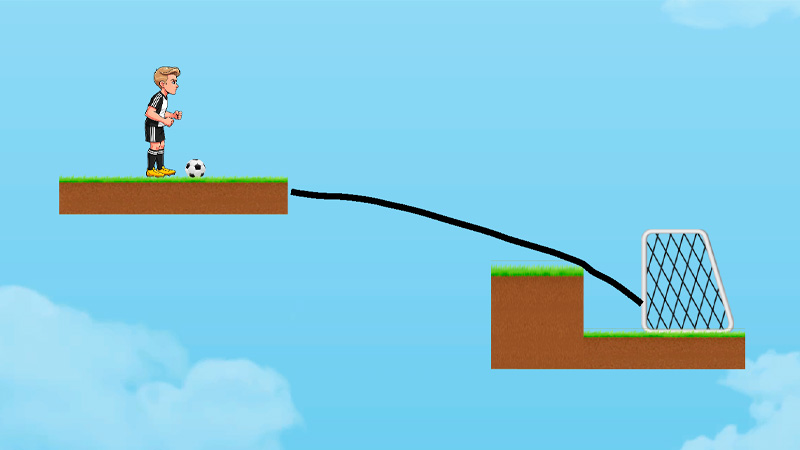
Draw to Goal is a 2D physics puzzle game where your objective is to draw the perfect path to guide a soccer ball into the goal. Instead of controlling the ball directly, you'll create ramps, curves, and clever trajectories, then let gravity and momentum do the rest. Every level challenges your logic, spatial reasoning, and creativity as you avoid moving obstacles, use bounce angles, and discover the smartest route to score. With hundreds of handcrafted puzzles, intuitive controls, and increasingly complex layouts, Draw to Goal transforms every goal into a satisfying brain teaser.
Key Features in Draw to Goal
- Draw Your Own Solution: Create ramps, curves, or creative paths to guide the soccer ball safely into the net.
- Realistic Physics: Every line you draw affects the ball's speed, direction, and bounce, making each shot feel satisfying.
- Handcrafted Puzzle Levels: Tackle carefully designed stages that introduce fresh layouts and new challenges as you progress.
- Tricky Obstacles: Outsmart moving barriers, narrow gaps, and awkward platforms that stand between you and the goal.
- More Than One Way to Win: Many puzzles can be solved with different paths, encouraging you to experiment and think creatively.
- Easy to Pick Up, Fun to Master: Simple drawing controls make the game accessible, while tougher levels reward careful planning and smart timing.
Gameplay Guide for Draw to Goal
Every puzzle has one goal: get the soccer ball into the net. Success comes from drawing smart paths, predicting the ball's movement, and adapting to each level's unique obstacles.
Gameplay Basics
- Study the Level First: Observe the position of the goal, obstacles, and moving hazards before drawing your path.
- Draw the Perfect Route: Create ramps, curves, or angled lines that naturally guide the ball toward the net using gravity and momentum.
- Avoid Obstacles: Watch out for moving barriers, traps, and tight spaces that can stop the ball before it reaches the goal.
- Complete Every Puzzle: Each handcrafted level introduces new layouts and mechanics, encouraging you to think creatively instead of repeating the same solution.
Game Controls
PC:
- Left Mouse Button: Drag and draw a path.
- Click the Kick Button: Shoot the ball
Mobile:
- Touch and Drag: Draw the ball's path with your finger.
Helpful Tips & Tricks
- Plan Before Drawing: Study the entire level before making your first line.
- Use Gentle Curves: Smooth paths often create more reliable ball movement.
- Take Advantage of Bounces: Walls can help redirect the ball toward the goal.
- Watch Moving Obstacles: Wait for the right timing before launching the ball.
- Experiment Freely: If one solution fails, redraw a different route.
Ready to Draw the Winning Goal?
Grab your virtual pen and put your creativity to the test in Draw to Goal! Draw clever paths, outsmart tricky obstacles, master realistic physics, and score spectacular goals through hundreds of fun and challenging puzzle levels.
Similar Physics Puzzle Games
- Brain Lines
- Happy Glass
- Bloxorz
- Draw To Smash
- Angry Birds