
Game Controls
- WASD - move
- Left-click - action
- 1-7 - change tool
- Space - jump






















Gold Rush: Gold Simulator 3D
About Gold Rush: Gold Simulator 3D
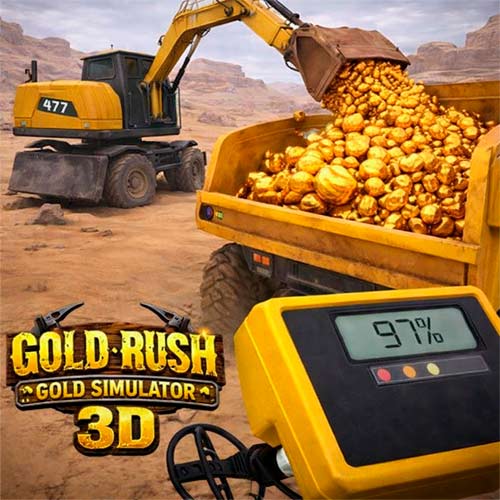
Gold Rush: Gold Simulator 3D is a casual gold mining simulation game where you explore open terrain with a metal detector, dig underground deposits, process raw materials, and expand your personal mining operation over time. Instead of fast-paced action, the game focuses on resource discovery, excavation mechanics, equipment upgrades, and gradual progression.
The main objective is simple but satisfying: locate valuable signals, extract resources efficiently, sell what you find, and reinvest earnings into better tools and new systems. As you progress, the experience grows beyond basic digging into activities like repairing machinery, unlocking processing stations, and collecting rare items such as artifacts or fossils. This steady progression loop is one of the reasons players often describe the game as calm yet rewarding.
How to Play Gold Rush: Gold Simulator 3D
In the simulation game, the player begins with a detector and a small set of tools. Your first task is to explore the environment and search for signal hotspots that indicate buried resources. Stronger signals usually lead to better discoveries.
A typical session follows a clear routine:
- scan the ground using the metal detector
- locate high-signal areas
- dig underground deposits carefully
- collect minerals and valuables
- clean or process materials at workstations
- sell resources to earn coins
- upgrade equipment and unlock new systems
As you progress, you can access larger tools, additional processing steps, and construction-related features that make your mining workflow more efficient. Many players enjoy how the game slowly shifts from manual digging to managing a more advanced mining setup.
Game Controls
Controls are designed to stay simple so players can focus on exploration and excavation.
- WASD - move
- Left-click - action
- 1-7 - change tool
- Space - jump
The straightforward control scheme makes the game accessible even for players new to simulation-style mining games.
Tips and Strategies for Faster Progress
Learning how to manage time and tools efficiently makes a noticeable difference in early progression. Players who advance quickly usually focus on improving their search accuracy first.
Helpful strategies include:
- Upgrade your metal detector early to locate stronger signals faster
- Prioritize digging in high-signal zones instead of random areas
- Increase carrying capacity to reduce repeated trips
- Unlock processing stations before investing in cosmetic upgrades
- Explore widely to find collectibles like artifacts or fossil fragments
Many players also recommend treating the game as a steady progression experience rather than rushing upgrades. Taking time to improve equipment step by step makes later expansion smoother and more rewarding.
Play Gold Rush: Gold Simulator 3D now! Grab your detector, start digging, and see what treasures you can uncover today.