Game Controls
PC
- Left Mouse Button: Select a character icon.
- Click and Drag: Move an icon onto the stage.
- Mouse: Interact with characters and menu buttons.
Mobile
- Tap: Select icons and menu options.
- Touch and Drag: Place characters on the stage.













Sprunkybox
Introduction to Sprunkybox Game
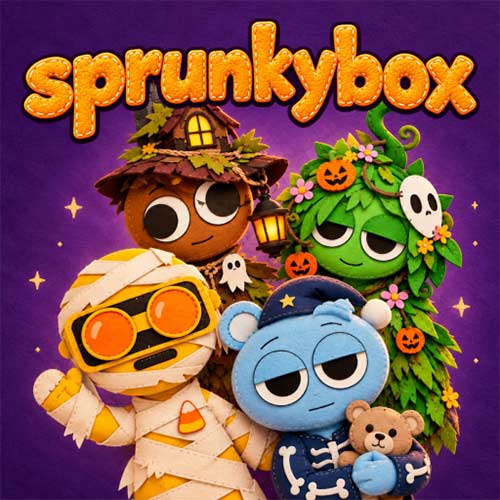
Sprunkybox is a 2D Halloween-themed music mixing game where you create your own tracks by combining sounds from a cast of colorful, spooky characters. Instead of playing instruments, you drag character icons onto the stage to activate different musical loops, beats, and effects. Each character contributes something to your composition, allowing you to experiment with rhythms and build layered sound combinations.
The theme gives the familiar Sprunki formula a playful twist. A moonlit purple sky, glowing stars, pumpkins, and characters dressed as vampires, witches, skeletons, and mummies create a festive atmosphere. With no complicated objectives or strict time limits, the game encourages you to explore different sounds and enjoy the creative process.
Halloween Music Mixing Highlights
- Sprunki-Inspired Gameplay: Combine character sounds to create layered musical tracks.
- Spooky Character Designs: Discover Halloween costumes featuring monsters, witches, skeletons, and mummies.
- Drag-and-Drop Music Creation: Add or replace characters to experiment with different sound combinations.
- Interactive Sound Mixing: Layer multiple characters to develop your own rhythm and melody.
- Festive Halloween Setting: Enjoy a moonlit stage decorated with pumpkins, stars, and purple clouds.
How to Play and Mix Beats
The goal is simple: arrange different characters on stage and combine their sounds to create a unique musical mix.
Gameplay Guide
- Choose a Character: Pick an icon from the Halloween-themed collection at the bottom of the screen.
- Drag onto the Stage: Place the icon on an empty gray character to activate its costume and sound.
- Mix Different Sounds: Add more characters to layer musical loops and experiment with new combinations.
- Change Your Lineup: Remove or replace characters to explore different rhythms and arrangements.
Game Controls
PC
- Left Mouse Button: Select a character icon.
- Click and Drag: Move an icon onto the stage.
- Mouse: Interact with characters and menu buttons.
Mobile
- Tap: Select icons and menu options.
- Touch and Drag: Place characters on the stage.
Tips for Better Music Mixing
- Start with a beat: Add one or two characters before building more complex arrangements.
- Experiment with combinations: Try different characters to discover how their sounds work together.
- Build gradually: Add new loops one at a time to hear how they change your track.
- Swap characters: Replace sounds that don't fit your desired rhythm.