Game Controls
PC
- Mouse: Navigate the interface.
- Left Click: Select a vehicle or button.
Mobile: Tap: Choose vehicles and interact with the game.
























Bus Fever
Introduction to Bus Fever
Bus Fever is a 2D parking puzzle game where a busy station full of colorful vehicles becomes a surprisingly tricky logic challenge. Instead of driving the buses yourself, you decide which cars, vans, and buses should move and in what order. Each vehicle follows a fixed direction, while passengers need transportation that matches their color. Limited space means one careless choice can leave useful vehicles trapped or send the wrong one into a waiting area. To clear each stage, you need to read the layout, manage available space, and gradually turn a chaotic traffic jam into an empty parking lot.
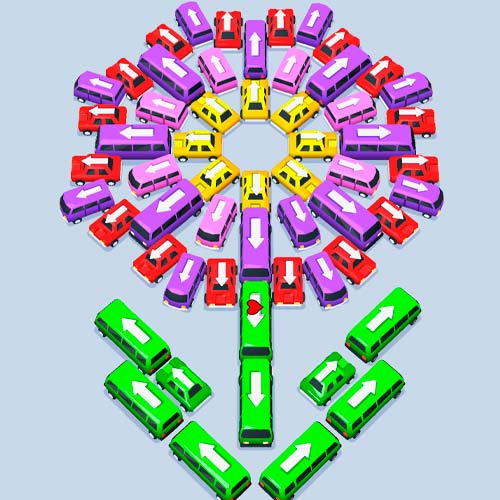
Bus Fever - A colorful parking puzzle about sorting traffic and getting passengers onto the right vehicles
Highlight Features
- Traffic Puzzle Gameplay: Find the right sequence to untangle crowded vehicle layouts.
- Passenger Color Matching: Pair waiting passengers with transportation of the corresponding color.
- Cars, Vans, and Buses: Work with vehicles carrying 4, 6, or 10 passengers.
- Directional Movement: Read the arrows and identify which vehicles have a valid way out.
- Strategic Space Management: Keep useful spaces available and avoid moves that make the jam harder to solve.
Gameplay Guide in Bus Fever
At first glance, the solution may seem as simple as tapping any vehicle with an open path. That approach quickly causes problems.
Solve Traffic Jams
Each puzzle begins with vehicles positioned tightly together, leaving little room for careless moves. Look at the directional arrows before making a selection because a vehicle can only exit along its indicated path. Removing an accessible vehicle can open a route for several others, so the order you choose matters.
Getting vehicles out is only half of the challenge. You also need to coordinate them with the color-coded passengers waiting nearby. Cars, vans, and buses have different seating capacities - 4, 6, and 10 passengers respectively - so choosing the right type at the right moment can help keep the flow moving.
Game Controls
PC
- Mouse: Navigate the interface.
- Left Click: Select a vehicle or button.
Mobile: Tap: Choose vehicles and interact with the game.
Tips and Tricks
- Look for vehicles that can immediately leave without blocking a useful route.
- Check passenger colors before sending transportation out of the parking area.
- Remember the different capacities when choosing between cars, vans, and buses.
- Prioritize moves that unlock several vehicles rather than only one.
- Keep spare space available whenever possible.
Every packed parking lot has a solution you just need to find the right order. Play Bus Fever online, organize the traffic, match every passenger with the right ride, and clear each colorful puzzle.