
Nerdle Game Controls Guide
Desktop
- Keyboard: Type numbers (0-9), operators (+, -, ×, ÷, * , /), and the equals sign (=).
- Enter: Submit your guess.
- Backspace/Delete: Remove characters.
Mobile & Tablet
- Tap the on-screen keyboard to enter numbers and operators.
- Tap Enter to submit your equation.
- Tap Delete to remove characters.







Nerdle
What Is Nerdle?
Nerdle is a daily math puzzle game that challenges players to uncover a hidden calculation in six guesses or fewer. Often described as a math-inspired alternative to word guessing games, Nerdle combines logical deduction, arithmetic, and pattern recognition into a surprisingly addictive daily challenge.
Instead of guessing words, you'll be guessing valid mathematical equations using numbers and operators. Every attempt gives feedback that helps you narrow down the solution until the entire calculation is revealed.
How Does Nerdle Work?
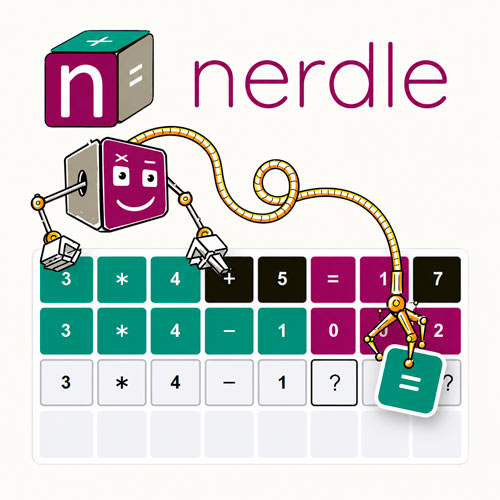
The goal is simple: find the hidden equation. In Nerdle, the solution consists of an 8-character calculation, such as: 3×4+5=17
After each guess, the game uses colored tiles to show how close you are to the correct answer.
Tile Colors Explained
Understanding the feedback system is the key to solving puzzles efficiently.
Green:
- Correct number or operator
- Correct position
Purple:
- Correct number or operator
- Wrong position
Black:
- Character is not part of the solution
Each new guess should use this information to eliminate possibilities and reveal new clues.
Valid Nerdle Equations
Not every equation can be entered into the game.
A valid Nerdle guess must:
- Contain numbers and mathematical operators
- Include exactly one equals sign (=)
- Have only a number on the right side of the equation
- Follow the standard order of operations
- Be mathematically correct
Nerdle Game Controls Guide
Nerdle uses very simple controls, making it easy to play on both desktop and mobile devices.
Desktop
- Keyboard: Type numbers (0-9), operators (+, -, ×, ÷, * , /), and the equals sign (=).
- Enter: Submit your guess.
- Backspace/Delete: Remove characters.
Mobile & Tablet
- Tap the on-screen keyboard to enter numbers and operators.
- Tap Enter to submit your equation.
- Tap Delete to remove characters.
Beginner Strategy Guide
If you're new to Nerdle, these tips can dramatically improve your results.
- Start With Diverse Characters: Use different numbers and operators in your opening guess to gather as much information as possible.
- Find the Equals Sign Early: The position of "=" often reveals the structure of the entire equation.
- Don't Focus Only on Green Tiles: Purple tiles can be just as valuable because they tell you which characters belong in the solution.
- Think Beyond the Obvious:Sometimes the best next guess isn't the most likely answer - it's the guess that reveals the most information.
- Use Logic, Not Luck: The strongest Nerdle players treat every guess as a clue-gathering exercise rather than a random attempt.
Why Nerdle Is So Addictive
What makes Nerdle special is that it rewards reasoning rather than memorization. Here are some standout features that keep players returning every day.
- Daily mathematical challenge
- Simple rules, deep strategy
- Universal language of mathematics
- Educational and brain-training benefits
Try Similar Logic Puzzle Games
- Wordle - Guess the hidden word using logic and clues.
- Worldle - Identify countries and landmarks through geography-based puzzles.
- Clash Royale Wordle - Test Clash Royale knowledge with daily word challenges.
Nerdle successfully transforms simple equations into engaging puzzles that feel rewarding to solve. With daily challenges, multiple game modes, and a strong focus on deduction, it's easy to see why millions of players have embraced the Nerdleverse.