Game Controls
- WASD / Arrow keys: Move
- Mouse: Look around and aim.
- L: Lock or unlock the mouse cursor.
- Pause Button: Pause the game.











Rifle Duty FPS
About Rifle Duty FPS
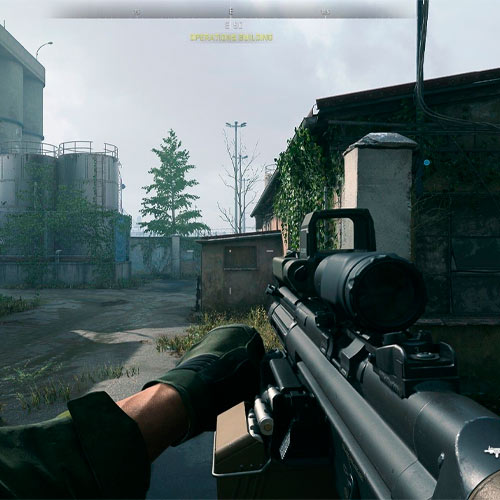
Rifle Duty FPS is a 3D FPS game that puts you in the boots of an armed soldier fighting through a heavily guarded military facility. With the intense gunplay, this shooting game challenges you to eliminate enemy soldiers, stay alive under fire, and complete your combat mission.
Armed with a rifle, you'll face hostile forces inside an industrial environment filled with corridors, elevated walkways, and potential ambush points. Choose your difficulty, watch your ammunition, and rely on accurate shooting and smart positioning to survive.
Military FPS Combat Features
- First-Person Gunplay: Experience combat directly through your soldier's perspective.
- Three Difficulty Levels: Choose Easy, Normal, or Hard to match your shooting skills.
- Enemy Elimination Objective: Track how many hostile soldiers remain during combat.
- Military Facility Setting: Fight inside a 3D industrial environment with enclosed spaces and elevated structures.
- Combat HUD: Monitor your health, ammunition, and remaining enemies.
- Tactical Shooting: Use careful aiming, positioning, and ammunition management to improve your survival chances.
Shooting Gameplay Mechanics
Your main objective is to eliminate the enemy forces while keeping your soldier alive. Before entering combat, select one of the three difficulty settings.
Aim, Shoot, and Eliminate Enemies
Explore the military facility from a first-person perspective and stay alert for enemy soldiers. Keep your crosshair ready as you move through corridors and approach open areas. Aim carefully before firing rather than wasting ammunition on inaccurate shots. Watch the enemy counter at the top of the screen to track your progress.
Manage Health and Ammunition
Your health bar shows how much damage you can withstand, while the ammunition display tracks the bullets available in your rifle. Avoid standing in exposed areas for too long. Use the surrounding environment to reduce incoming fire, check your ammunition regularly, and reload when it is safe.
Game Controls
- WASD / Arrow keys: Move
- Mouse: Look around and aim.
- L: Lock or unlock the mouse cursor.
- Pause Button: Pause the game.
Tips and Tricks to Survive Enemy Fire
- Start on Easy: Learn the environment and combat mechanics before increasing difficulty.
- Keep Your Crosshair Ready: Stay prepared when approaching corners and doorways.
- Avoid Wasting Bullets: Fire carefully and monitor your remaining ammunition.
- Watch Your Health: Limit unnecessary exposure to enemy attacks.
- Check the Enemy Counter: Track how many opponents you still need to eliminate.