

Game Controls
PC
- W, A, S, D - Move.
- Mouse - Look around.
- Left Mouse Button - Interact or use items.
- Shift - Run (when safe to do so).
- Ctrl / C - Crouch.
- E - Interact with objects.
Mobile
- Virtual Joystick - Move.
- Touch Buttons - Look around, interact, crouch, and use collected items.
















Evil Nun 2: Origins
Introduction to Evil Nun 2: Origins
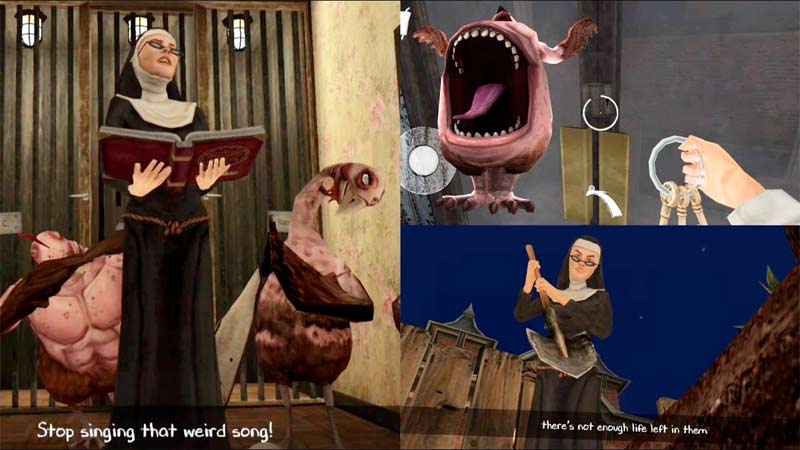
Evil Nun 2: Origins is a first-person stealth horror puzzle game where you must escape a haunted school while uncovering the terrifying origin of Sister Madeline. Developed by Keplerians Horror Games, this prequel expands the previous Evil Nun story with deeper lore, immersive exploration, crafting mechanics, and multiple enemies that constantly keep you on edge.
You play as William, a student trapped inside a sinister school where Sister Madeline is preparing a dark ritual to resurrect her daughter. To survive, you'll sneak through classrooms and hidden passages, collect useful items, solve environmental puzzles, and avoid not only the murderous nun but also other horrifying creatures lurking throughout the building. Every discovery reveals another piece of the nightmare that started it all.
Horror Game Features
- Story-Driven Horror: Discover the chilling origin of Sister Madeline in this Evil Nun prequel.
- Stealth-Based Survival: Hide, move quietly, and avoid being caught by dangerous enemies.
- Puzzle & Crafting Mechanics: Collect items, craft useful objects, and solve challenging puzzles.
- Open School Exploration: Search classrooms, secret rooms, and hidden passages for clues.
- Multiple Enemy Types: Outsmart Sister Madeline, mutant chickens, and other terrifying threats.
- Immersive Horror Atmosphere: Detailed 3D environments, eerie sound effects, and constant suspense create an unforgettable experience.
Gameplay Guide for Evil Nun 2: Origins
Escaping the school requires much more than running away. Careful exploration, stealth, and smart puzzle-solving are essential if you want to survive.
Gameplay Basics
- Explore the Haunted School: Search every classroom, hallway, and hidden room for keys, clues, and important objects. Many areas remain inaccessible until you've solved previous puzzles.
- Stay Hidden: Sister Madeline constantly patrols the building. Move quietly, avoid making unnecessary noise, and use the environment to stay out of sight whenever possible.
- Solve Puzzles and Craft Items: Collect useful materials and combine them into tools that unlock doors, activate mechanisms, or help you progress deeper into the story.
- Watch Out for Multiple Enemies: The evil nun isn't your only threat. Mutant chickens and other hostile creatures patrol certain areas, forcing you to change your strategy depending on the danger.
- Uncover the Story: Documents, hidden objects, and environmental details gradually reveal the tragic events that transformed Sister Madeline into the terrifying figure you know from the original Evil Nun.
Game Controls
PC
- W, A, S, D - Move.
- Mouse - Look around.
- Left Mouse Button - Interact or use items.
- Shift - Run (when safe to do so).
- Ctrl / C - Crouch.
- E - Interact with objects.
Mobile
- Virtual Joystick - Move.
- Touch Buttons - Look around, interact, crouch, and use collected items.
Helpful Survival Tips Tricks
- Walk Instead of Running: Staying quiet greatly reduces your chances of being detected.
- Search Every Room: Important keys and crafting materials are often hidden in unexpected places.
- Remember Locked Areas: Return later after finding new tools or puzzle items.
- Manage Your Resources: Save useful crafted items for situations where they're truly needed.
- Learn Enemy Patterns: Watching patrol routes makes sneaking much safer than rushing through rooms.
Step inside Evil Nun 2: Origins, uncover the dark secrets behind Sister Madeline, solve clever puzzles, craft useful tools, and escape the haunted school before the nightmare claims another victim.



















