Controls
PC:
- Left Mouse Button: Select a fruit and release it from the board.
- Mouse Click: Navigate menus and select available options.
Mobile:
- Tap: Select a fruit to drop it into the basket.
- Tap Menu Buttons: Navigate the game.


















Fruit Match
Welcome the the Relaxing World of Fruit Match
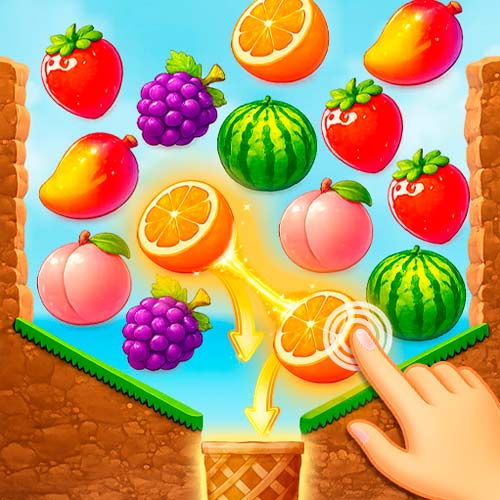
Fruit Match is a physics-based puzzle game where you release identical fruits into a basket to clear the board. Instead of swapping tiles on a fixed grid, you choose fruits individually and watch them tumble, collide, and stack on top of one another. Some may get stuck behind other fruits, so the order of your moves matters. Clear the right pieces, trigger satisfying chain reactions, and keep the basket from filling up as you work through increasingly tricky levels.
What Makes Fruit Match Different?
- Pair Matching: Select two identical fruits to merge them automatically in the basket.
- Gravity-Based Physics: Fruits fall, roll, collide, and stack naturally.
- Chain Reactions: Removing supporting fruits can release several blocked pieces.
- Limited Basket Space: Avoid filling the basket with unmatched fruits.
- Progressive Puzzles: Face more complicated fruit arrangements as you advance.
- Simple Controls: Play with mouse clicks or touchscreen taps.
Guide to Play Fruit Match
The goal is to clear every fruit from the board by matching identical pairs while managing the limited space in your basket.
Core Mission
Click a fruit to release it into the basket below, then select another fruit of the same type. When the matching fruits reach the basket, they merge and disappear. Not every fruit falls directly into the basket. Some get trapped on top of other pieces. Remove the fruits underneath to open a path and create chain reactions. Unmatched fruits take up valuable room in the basket. Plan your selections carefully and complete pairs before the basket becomes overcrowded. Clear the board to finish the level.
Fruit Match Controls
PC:
- Left Mouse Button: Select a fruit and release it from the board.
- Mouse Click: Navigate menus and select available options.
Mobile:
- Tap: Select a fruit to drop it into the basket.
- Tap Menu Buttons: Navigate the game.
Tips for Clearing Fruit Puzzles
- Look for matching pairs first: Avoid dropping a fruit unless you can find its partner.
- Clear lower obstacles: Removing supporting fruits can free pieces trapped above.
- Watch the basket: Keep enough room available for your next match.
- Plan ahead: Consider how the remaining fruits will move after each selection.
- Use chain reactions: Prioritize moves that open paths for multiple fruits.
Why Gravity Changes Every Match
Unlike traditional fruit-matching games, Fruit Match makes the position of each fruit just as important as its appearance. Removing a fruit near the bottom can cause several others to shift or fall, sometimes opening up new matching opportunities.
This creates an interesting choice: should you match the easiest visible pair or remove the fruits supporting a larger cluster? A carefully planned move can clear a path for several pieces, while a poor choice may leave the basket crowded with unmatched fruit.