Driving and Crash Controls
PC
- WASD: Drive
- Space: Brake / handbrake
- Shift: Nitro boost
- C: Change camera
- B: Slow motion
- K: Restore car
- N: Switch to the next car
- Tab: Pause menu
Mobile
- On-screen controls: Drive and access vehicle actions











My Car My Rules
My Car My Rules: A Sandbox Built for Crashes
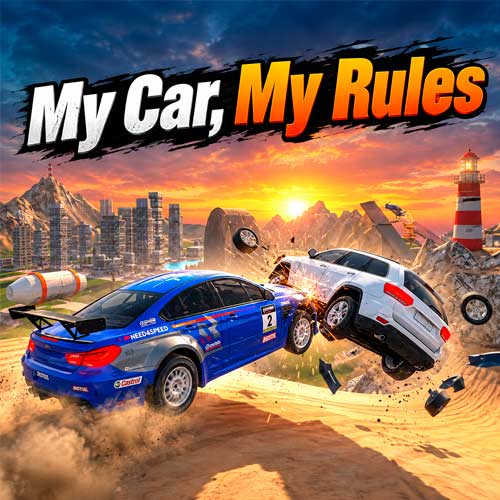
My Car My Rules is a 3D vehicle destruction sandbox that gives you a car and plenty of reasons not to keep it in one piece. Pick up speed across the open map, aim for a ramp or obstacle, and see what survives the impact. A hard landing might tear off a wheel, while a head-on collision can leave the bodywork bent and the bumper broken. Want a bigger wreck? Hit the nitro and try again. You can slow the action down to watch the crash unfold, restore your vehicle in seconds, or switch cars and find out how the next one handles the same punishment. No finish line, no pressure to protect the car. Pick a vehicle, find a ramp, and turn your next crash into a new experiment.
Driving and Destruction Highlights
- Open-Ended Driving: Explore freely instead of following a traditional race objective.
- Crash Physics: Vehicle damage responds to the force and direction of collisions.
- Visible Car Damage: Body panels bend, bumpers break, and wheels can detach after major impacts.
- Ramps and Obstacles: Build speed, launch into the air, and create different crash scenarios.
- Nitro Boost: Add extra speed before a jump or collision.
- Slow Motion: Reduce the action to get a clearer look at destructive impacts.
- Quick Reset: Restore a damaged vehicle and immediately try another approach.
Gameplay Explained
There is no finish line to chase. Pick a vehicle, explore the environment, and create your own stunt and crash experiments.
Core Mission
- Drive, Launch, and Crash: Accelerate toward ramps and obstacles, use nitro when you need extra speed, and see how the car handles the resulting impact. Try changing your approach instead of repeating exactly the same collision.
- Restore and Experiment Again: After a heavy crash, restore the vehicle and run the test again. Changing your speed, approach angle, or chosen vehicle can produce a noticeably different wreck.
Driving and Crash Controls
PC
- WASD: Drive
- Space: Brake / handbrake
- Shift: Nitro boost
- C: Change camera
- B: Slow motion
- K: Restore car
- N: Switch to the next car
- Tab: Pause menu
Mobile
- On-screen controls: Drive and access vehicle actions
Turn Every Crash Into a Physics Test
The sandbox becomes more interesting when you treat each collision as a test rather than random destruction. Hitting the same obstacle at a different speed or angle changes how the force reaches the vehicle. A direct impact may crush the front end, while an awkward landing after a ramp can put more stress on the wheels and body.
Slow motion makes those differences easier to watch. Afterward, restore the car, adjust your approach, and repeat the stunt. This simple crash → observe → reset → retry loop gives this driving game its experimental feel without needing races, missions, or a traditional win condition.
Vehicle Destruction Tips Tricks
- Use nitro before ramps: Extra speed can produce bigger jumps and harder impacts.
- Change your approach: Test the same obstacle from different angles.
- Try slow motion: Get a clearer view of how the vehicle reacts during a crash.
- Restore after heavy damage: Reset quickly instead of driving a badly damaged car.
- Switch vehicles: Compare how different cars behave during similar stunts.