Simple Controls
- PC: Hold Left Mouse Button + Drag: Move the paddle
- Mobile: Touch + Drag: Move the paddle.














Ping Pong 3D
Introduction to Ping Pong 3D
Ping Pong 3D is a 3D table tennis game where timing, paddle positioning, and quick reactions decide every point. Face a computer-controlled opponent across the table, track the incoming ball, and move your paddle into position for a clean return. The controls are simple, but maintaining a rally becomes harder when the ball comes back at an awkward angle or leaves you little time to react. In this sports game, with Easy, Normal, and Hard difficulty options, players can start with manageable exchanges before testing your reflexes against a tougher bot.
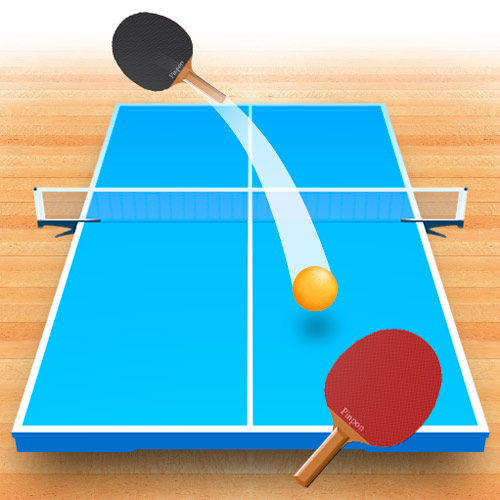
Ping Pong 3D - A 3D table tennis game where you track the ball, return precise shots, and outscore an AI opponent.
Game Highlights
- 3D Table Tennis Matches: Play head-to-head rallies against a computer-controlled opponent.
- Direct Paddle Control: Move the racket yourself to meet each incoming ball.
- Three Difficulty Levels: Choose between Easy, Normal, and Hard.
- Physics-Based Ball Movement: Read the ball's direction and position your paddle for each return.
- Reaction-Focused Gameplay: Quick positioning becomes increasingly important during fast exchanges.
- Simple Match Scoring: Win points by returning the ball more consistently than the bot.
How to Play Ping Pong 3D
There are no complicated shot combinations to memorize. Your paddle movement does the work, leaving you to concentrate on where the ball is going and when it will reach you.
Control the Rally
Follow the ball from the opponent's paddle and move your racket into its path before it reaches your side. A successful return sends the rally back across the net, while missing the ball gives your opponent the advantage.
Longer exchanges demand faster reactions and better positioning. Instead of chasing the ball after it has already passed you, anticipate its trajectory and keep the paddle ready for the next return. For a different level of pressure, switch between Easy, Normal, and Hard. Higher difficulty makes accurate positioning and quick reactions increasingly important.
Simple Controls
The game uses direct paddle movement, making it easy to start:
- PC: Hold Left Mouse Button + Drag: Move the paddle
- Mobile: Touch + Drag: Move the paddle.
Table Tennis Timing and Reflex Tips
- Track the ball early: Watch its path as soon as the bot returns it.
- Stay centered: Keep the paddle ready to cover either side.
- Move smoothly: Avoid large, unnecessary paddle movements.
- Anticipate the return: React to where the ball is heading.
- Practice on Easy: Build consistency before trying harder modes.
Pick your difficulty, keep your eyes on the ball, and see how long you can control the rally in Ping Pong 3D today!