Quick Game Controls
Here’s a quick overview of the controls based on the game's interface:
- Start/Stop Engine – Button on the right side
- Gear Shifter (P / N / D / R) – Right-side vertical lever
- Steering – Use the virtual steering wheel or arrow keys
- Headlights – Toggle button on the left
- Pause / Camera – Buttons at the top-left corner














Truck Simulator
Introduction to Truck Simulator
Truck Simulator is an expanded driving game due to which you are equipped with a fully modeled truck cabin and challenged to start the engine, gear shift, follow directional routes, and accomplish the driving missions with high accuracy. All the details, such as buckling your seatbelt and glancing at the mirrors and avoiding traffic jams, are the elements of the real truck driving experience. The game combines simple to play mechanics with realistic driving dynamics that would make it fun to play with casual players and fulfilling to those who like simulation games.
Outstanding Features
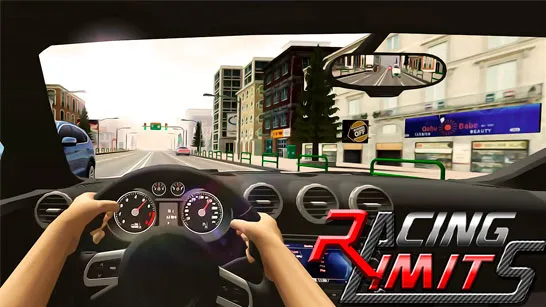
- Full First-Person Cabin View: You get a complete dashboard perspective: steering wheel, mirrors, gauges, gear panel, GPS, and even seatbelt alerts. Everything is designed to make you feel as if you're really in the truck.
- Interactive Truck Controls: Screenshots show realistic onboarding steps:
- Buckle your seatbelt
- Press the Start/Stop button
- Shift gears between P, N, D, and R
- Adjust headlights
- Use the virtual steering wheel or arrow controls
These interactive elements bring true simulation depth.
- Dynamic Driving Missions: Whether it is going through storage yards with rows of shipping containers or driving using the highlighted roads with bright directional signs, each mission needs precise driving and consciousness.
- Realistic Physics & Handling: World do not turn like cars, this game takes it into account. Large swings, reduced acceleration and heavy braking give every move a heavy and realistic feeling.
- GPS Navigation: Your HUD shows distance markers (such as 440 m), helping you follow routes, locate delivery points, and stay on track.
Instruction to Play
The initial phases of Truck Simulator are easy, and the rest requires practice before acquiring the mechanics. Now here is the start of your usual run:
Step 1: Fasten Your Seatbelt: There is a message which reminds you that you ought to fasten your seat-belt before driving.
Step 2: Start the Engine: Press the Start /Stop button on the right panel to start the truck.
Step 3: Shift Your Gear: Shifts Shift the shifter to D (Drive) as directed on-screen.
Step 4: Use the Steering Controls
Choose between:
- Virtual steering wheel
- Left/right arrow buttons
Both offer responsive control depending on your driving style.
Step 5: Follow the Arrow Indicators: Glowing orange arrows guide you through the route toward your destination.
Step 6: Drive Carefully: The mission should be accomplished safely by avoiding obstacles and being on track.
The Reason Truck Simulator Is So Popular
- Real interior perspective makes all the drives real.
- Onboarding makes novices learn step by step in driving.
- Huge industrial locations with containers, signs, and traffic.
- Slick controls that are mobile and desktop-friendly.
- Difficult tasks that are compensated with accuracy and patience.
The game is very realistic and accessible at the same time and a good experience to play even when you have never played a simulator.
Quick Game Controls
Here’s a quick overview of the controls based on the game's interface:
- Start/Stop Engine – Button on the right side
- Gear Shifter (P / N / D / R) – Right-side vertical lever
- Steering – Use the virtual steering wheel or arrow keys
- Headlights – Toggle button on the left
- Pause / Camera – Buttons at the top-left corner
These intuitive controls make it easy to focus on the road and enjoy the simulation.
Truck Simulator is one of the most realistic truck-driving games on a browser. Its realistic cabin layout, engine control in steps, directional control and a tight mission design give it a realistic feel of driving a heavy vehicle without overwhelming the players.