Game Controls
- Mouse Click: Select materials, organisms, and tools.
- Click and Drag: Place elements inside the aquarium.
- Clear Tool: Remove unwanted elements.
- Fast Forward: Accelerate the simulation.
- Reset: Start a new ecosystem.



















Orb Farm
Orb Farm Game Introduction
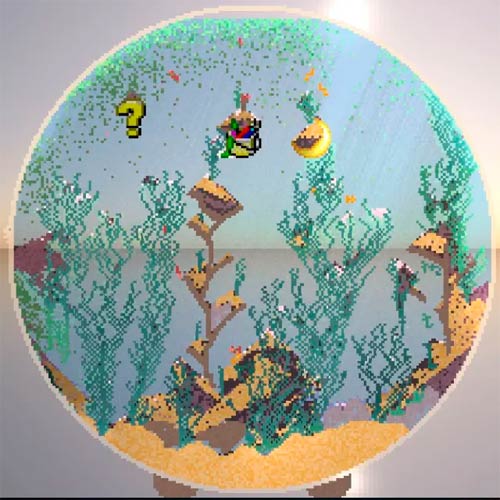
Orb Farm is a relaxing 2D ecosystem simulation game. Instead of growing crops or managing a traditional farm, you build a miniature underwater world inside a glass orb, where plants, microorganisms, and fish interact with their surroundings.
What makes this pixel-art sandbox fascinating is that everything is connected. Algae provide food for tiny organisms, bacteria help break down organic matter, and aquatic plants contribute to the balance of oxygen and carbon dioxide. Add too many fish or disturb the environment, and your carefully built ecosystem may collapse.
There are no levels to complete or enemies to defeat. You're free to experiment, observe the results, and discover what it takes to keep a small aquatic world alive.
Create Your Own Living Aquarium
The game gives you a collection of materials and living organisms to experiment with:
- Custom Aquarium Building: Use sand, water, glass, stones, and wood to shape your underwater environment.
- Interactive Ecosystem: Watch algae, grass, bacteria, daphnia, and fish interact through a miniature food chain.
- Oxygen and CO₂ Simulation: Monitor changing environmental conditions that affect aquatic life.
- Day and Night Cycle: Observe how changing light influences your tiny world.
- Pixel-Art Sandbox: Experiment freely with different layouts and combinations of organisms.
How to Play Orb Farm
Your goal is to create a balanced aquatic ecosystem that can support life over time. There's no single correct design, so start small and observe how each addition changes the environment.
Game Mission
Build the Aquarium
Begin by placing sand along the bottom of the orb, then add water to create a suitable habitat. You can use stones, wood, and other materials to shape the environment.
Select an element from the toolbar and click or drag inside the orb to place it.
Introduce Plants and Aquatic Life
Add grass and algae before introducing animals. These organisms form an important part of the ecosystem by supporting oxygen production and providing food.
Next, introduce bacteria and daphnia. Once the environment appears stable, try adding a few fish.
Avoid filling the aquarium with animals immediately. A growing population needs enough oxygen and food to survive.
Watch the Ecosystem Develop
Keep an eye on the O₂ and CO₂ indicators as your aquarium changes. If organisms begin dying, examine the balance between plants, animals, and available resources.
You can speed up the simulation to observe changes more quickly or reset the orb to try another approach.
Game Controls
- Mouse Click: Select materials, organisms, and tools.
- Click and Drag: Place elements inside the aquarium.
- Clear Tool: Remove unwanted elements.
- Fast Forward: Accelerate the simulation.
- Reset: Start a new ecosystem.
Can You Keep Your Ecosystem Alive?
Building an attractive aquarium is easy compared with maintaining a healthy one. These simple strategies can help:
- Start with plants and microorganisms before adding fish.
- Introduce animals gradually to avoid overwhelming the ecosystem.
- Monitor oxygen and carbon dioxide levels regularly.
- Change one element at a time to understand its effects.
- Experiment with different layouts to discover more stable environments.